Tile color adjustments for mahjong players on Android devices
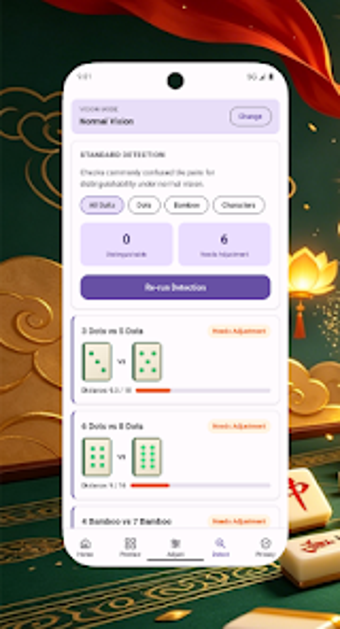
At a noisy mahjong table, similar tile colors can derail a hand; 5RT TileHueAid, by Liu Nu, addresses that everyday hurdle. The app lets players alter tile appearance to improve distinction between suits and markings, using controls tuned to mahjong palettes. Its design aims for quick, on-the-table adjustments so people with color vision differences or anyone needing stronger tile contrast can keep pace during social matches.
How the tool fits into live, in-person mahjong play
The app is an Android utility built to be used before or during a session: it runs locally on compatible phones and does not require an online connection. Practical effects include immediate visual changes so users can test settings under their table lighting. The developer notes typical compatibility begins with Android 7.0 or later, and the app’s small footprint keeps it suitable for older devices with limited spare storage.
Who benefits at the table and how it addresses visual needs
TileHueAid focuses narrowly on helping players who struggle to tell suits apart. It provides visibility presets aimed at common types of color vision differences and manual controls for fine-tuning contrast and color balance. Use case: a casual group or a competitive player who needs reliable tile differentiation in dim rooms, rather than someone seeking gameplay tracking or social features.
Privacy posture and the app’s community reach
The app emphasizes local processing and does not force sharing of personal data, a design choice that preserves player privacy while operating offline. Distribution notes: it is a niche utility with a modest user base and limited public ratings; the developer specialises in mahjong-related accessibility tools. Those facts suggest support and community resources may be smaller than for mainstream lifestyle apps.
To sum up, a focused accessibility tool for table play
To sum up, TileHueAid is a pragmatic option for players who need clearer tile recognition during hands, especially in social or low-light settings; it is less well suited to players seeking broad club-management or social features. Pro tip: try adjustments at your table and lock a preferred preset before a match to avoid mid-game fiddling with settings.